ChatGPT setup guide
Connect slAIdes to ChatGPT.
Add slAIdes as a custom MCP plugin, then create and edit your presentations from a ChatGPT conversation.
Open ChatGPT PluginsServer URL
https://slaides.app/api/mcpUse this exact address in the Connection field.
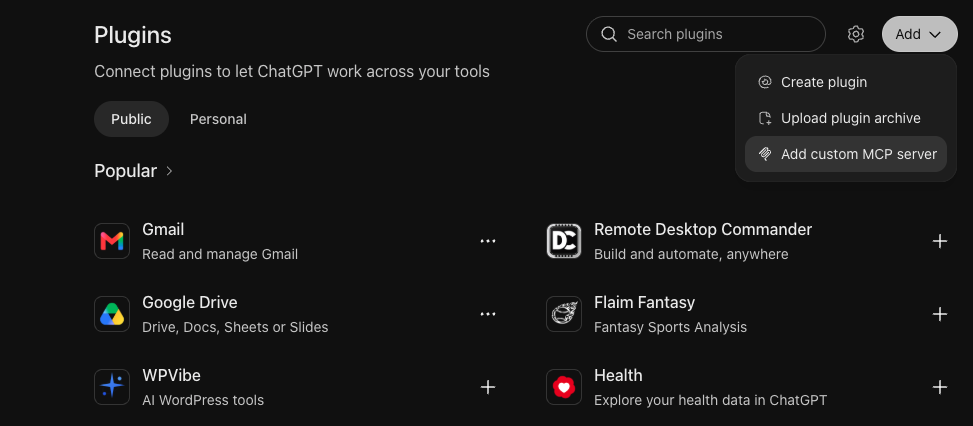
Open Plugins in ChatGPT
Go to chatgpt.com/plugins and sign in to ChatGPT if needed.
Add a custom MCP server
Click Add, then choose Add custom MCP server.
Enter the connection details
- Name
- slAIdes
- Connection → Server URL
- https://slaides.app/api/mcp
- Authentication
- OAuth
Review the acknowledgement, then select I understand and want to continue.
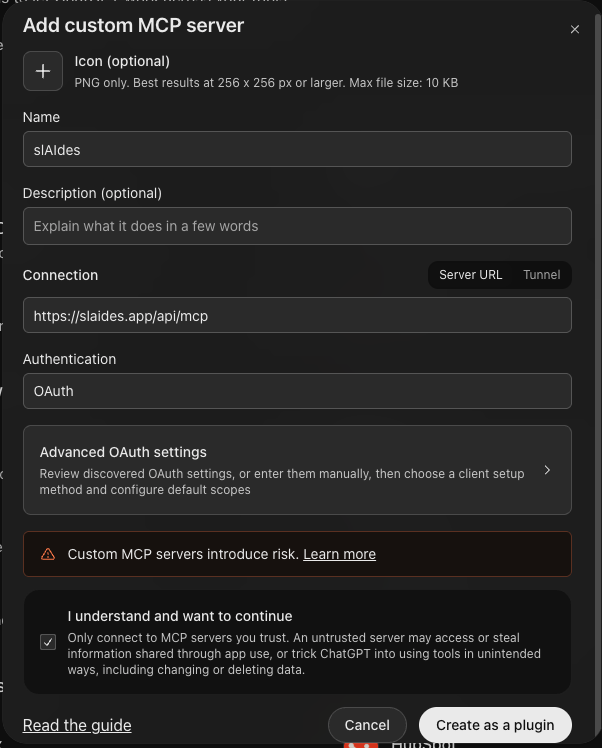
Create the plugin
Click Create as a plugin. When asked to connect your account, sign in to slAIdes and choose the account you want to use.
Ask for a presentation
In a ChatGPT conversation, type @slaides, select the plugin, and write your request.
@slaides create me a beautiful presentation
You can also ask slAIdes to revise an existing deck. Include the deck name and the changes you want in your message.